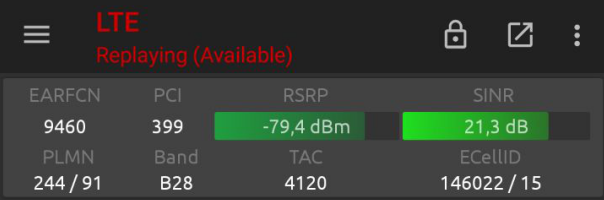
LG or Google has enabled B28 only few region. We checking configuration and figure out to enable this easily example in Finland.
Normally B28 is enabled only there region and networks:
- Australia: Telstra, Optus
- New Zealand: Spark
- Taiwan: FastEasTone
- Argentina: Movistar, Claro
- Panama: CW Panama
- French: (all networks)
With this instruction i help you to enable B28 every networks without limitation.
First make sure your Nexus 5X phone is rooted.
Requirements
- USB-cable between your desktop and phone
- On Windows, you must need Platformtools and drivers for your Nexus 5X installed.
- QPST-application. Please find application from internet
Please enable under Developer Tools USB-Debugging on your Android-phone. Then connect your phone with USB-cable to your desktop.
Open adb shell:
adb.exe shell
Enable Qualcomm modem mode
bullhead:/ $ su
bullhead:/ $ setprop sys.usb.config diag,adb
Now adb shell connection disconnect automatic and you must install Qualcomm drivers. Please lookup Device Manager on Windows and find Hardware ID what looks like ”MI_04”. Download drivers here: Mi5_Qualcomm_Drivers.zip. Install this driver manually and select qcmdm.inf file. Please check also instruction for Sony XZ.
Open QPST-application and go to Start Client -> EFS Explorer. Then go to policyman directory and copy carrier_policy.xml file to your desktop.
Edit this file on Rule 10: <rf_bands sub=”1″ list=”rf_bands_all” />
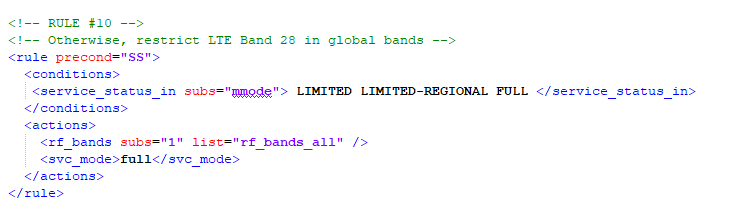
Copy file back to policyman directory and reboot your phone. Install Network Signal Guru Application to verify B28 band working. Make sure your ISP support this band on your area.